
TL;DR — Chemical Equation Entry
-
Use plain text formatting (not superscripts or symbols)
-
Use
_for subscripts and^for charges -
Use
->or<=>for reaction arrows - Use
.for hydrates, e.g.MgSO4.7H2O -
Always check the interpreted equation and any messages shown below the input box
-
If the editor reports the equation is not a valid chemical equation, it won’t be accepted
How the Chemical Equation Editor Works
The Chemical Equation Editor grades your answer based on how it interprets the equation, not how it looks on the page.
A few key ideas to keep in mind:
-
The editor parses chemical structure, not just text
-
Visual appearance is secondary to how the equation is read by the system
-
The preview shown below the input box displays what the editor understands
-
If the preview is wrong, the equation is wrong — even if your formatting looks correct
- If the editor cannot fully interpret the equation, it will report that the answer is not a valid chemical equation
A good rule of thumb:
If the interpreted equation looks right, your formatting is likely correct.
Want more detail?
The Chemical Equation Editor uses rules similar to the mhchem notation used in LaTeX and other educational tools.
If you’re curious about how chemical equations are parsed by software, you can learn more here: Chemistry notation using mhchem (Moodle documentation)
Writing Chemical Species
When entering chemical species, being explicit is safer for software than relying on visual formatting.
Subscripts
Use an underscore (_) to indicate subscripts.
Examples:
-
H_2O -
SO_4 -
Ca(OH)_2
Do not rely on visual subscripts or copied formatting. Plain text is more reliably interpreted by the editor.
Charges
Use caret notation (^) to indicate charges.
Examples:
-
Na^+ -
Cl^-
For charges with more than one character, use braces to avoid ambiguity:
-
Si^{2+} -
MnO_4^-
Using braces makes it clear which characters belong to the charge and helps prevent misinterpretation.
Writing Full Chemical Equations
Reaction arrows
Reaction arrows are typed using plain text characters, not symbols:
-
->for irreversible reactions -
<=>for equilibrium reactions
These arrows are typed directly. Adding spaces around arrows improves readability and helps the editor parse the equation correctly.
Multiple species
When writing multiple species in a reaction:
-
Separate species with spaces
-
Use
+both for charges and to separate species, but include spaces between species
Example:
-
H_3O^+ + OH^-
Spacing helps the editor distinguish between a charge and a separator.
Checking Your Equation Before Submitting
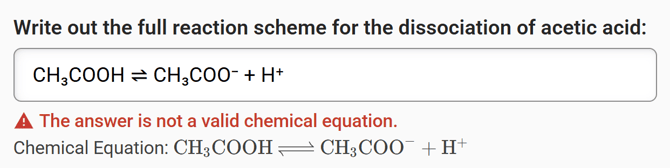
In this example, the equation looks chemically correct, but the editor reports that it is not a valid chemical equation due to a formatting issue (superscript symbols).
Before submitting your answer:
-
Look at the interpreted equation below the input box and confirm it is your intended chemical equation
-
If the editor reports that the equation is not a valid chemical equation, there is a formatting issue that must be fixed before submission
Common Formatting Mistakes
These issues are very common and often cause equations to be rejected:
-
Using Unicode superscripts instead of plain text
-
Copying equations from Word documents, PDFs, or websites
-
Missing braces around multi-character charges
-
Forgetting spaces between species in a reaction
If something isn’t working, slow down and check each part of the equation carefully.
Copying Equations from Other Sources
Copying and pasting equations from other sources can introduce hidden characters that interfere with how the editor interprets your input.
This is especially common when copying from:
-
PDFs
-
Word processors
-
Online sources (including AI tools)
If you’re having trouble after copying an equation, see: Why Copying and Pasting Chemical Equations Can Break Formatting
What to Do If Your Equation Still Isn’t Accepted
If your equation isn’t being accepted:
-
Formatting issues or an “invalid chemical equation” message:
Try fixing the formatting or contact support. -
Conceptual correctness or grading questions:
Contact your instructor, as they control grading and academic decisions.