
TL;DR — How to enter scientific notation
If your answer is written in scientific notation (for example, 5.0×10³), enter it using E notation:
-
Type
5.0e3 -
You can also use
5.0E3
Do not use ×, superscripts, or spaces — these won’t be accepted.
Scientific notation is commonly used in science to write very large or very small numbers.
In Stemble, scientific notation follows the same convention used by spreadsheets and many calculators. This means numbers must be entered using E notation, rather than symbols like ×10ⁿ.
How to enter scientific notation
When you want to write a number like this:
-
5.0×10³
It should be entered into Stemble like this:
-
5.0e3or5.0E3
Here are a few more examples:
Common input mistakes
These formats will not be accepted:
-
Using the multiplication symbol:
5.0 × 10^3 -
Using the letter 'x':
5.0 x 10^3 -
Using an asterisk:
5.0*10^3 -
Using a space:
5.0 10^3 -
Using superscript symbol:
10³
Even if these look correct mathematically, they won’t be read correctly by the system — this is a formatting issue, not a chemistry mistake.
Checking your entry
After you type your answer, Stemble may show a preview of the number below the input box. This preview is just a confirmation that your scientific notation was interpreted correctly.
If the preview matches the number you intended, your formatting is correct.
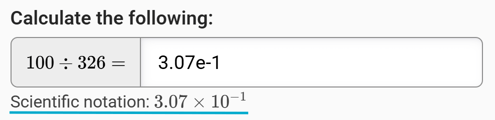
The interpretation of your scientific notation appears below the input box. In the image above, it’s underlined in blue to make it easier to see.
Does capitalization matter?
No — both e and E work.
For example:
-
5.0e3✅ -
5.0E3✅
However, spaces are not allowed, so make sure everything is typed together.
This formatting applies whenever you are entering numerical answers that use scientific notation.
Some questions may also require attention to significant figures or units, depending on the task instructions.
Still stuck?
If your answer still isn’t being accepted and you’re not sure why, email support@stemble.com with:
-
Your course name
-
The assignment name
-
The task number
We’ll be happy to help you get it sorted.